
Subtitles That
Keep Pace With
Your Video.
Drop in a clip from your camera roll, YouTube, or Instagram. Caption times every word to the frame, styles it to match your channel, and hands back a file ready to post.
Supports MP4, MOV, WebM · first export is free, no card required.
ACCURACY
Word sync
99.8%
LANGUAGES
Supported
20+


Avni Labs by the numbers
Fully online. Free to start.

10,000+
videos subtitled every day

20+
languages supported

99%
accurate subtitles
How It Works
Three simple steps to add professional subtitles to any video

Upload Your Video
Drag and drop or paste a YouTube / Instagram link. Supports MP4, WebM, MOV — or any link from the web.

Generate Captions
AI analyzes your audio and generates word-level timed subtitles with 99% accuracy in seconds.
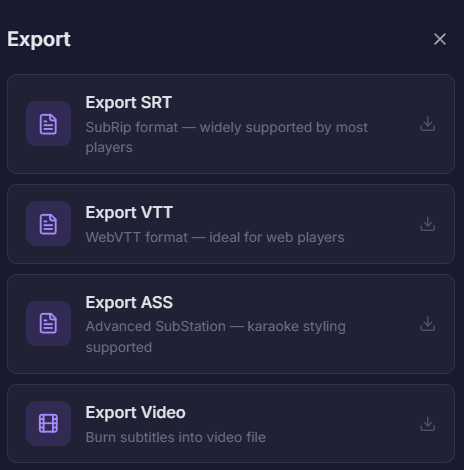
Customize & Export
Pick a style, tweak timing, translate to another language, and export your video — burned in or as SRT.
Already transforming
video creation across
industries
Hear directly from the teams who publish faster, collaborate better, and stay ahead.

Custom Styles
Choose font, size, color, outline, shadow, and background for your subtitles.
Auto-Generate Subtitles with
AI Precision
Our AI engine transcribes your video audio in 20+ languages with word-level timing accuracy. Generate subtitles in minutes, not hours or days.
- Word-level timestamp precision
- Multi-language transcription
- Optional translation to second language
- Automatic punctuation & formatting
- We support 40+ subtitle styles

Customize Every Detail
Pre-made templates, dynamic styles, and full text/position control to match your brand
Pre-Made Templates
Jump-start with professionally designed subtitle templates optimized for each social platform.
- Platform-specific presets
- One-click apply
- Fully editable after selection

Dynamic Styles & Animations
Add karaoke highlighting, word-by-word pop-in, typewriter effects, shake, glow, and more.
- Karaoke word highlight
- Pop-in & typewriter
- Shake, glow, and zoom effects

Text & Position Control
Full control over every visual property — font size, color, outline, shadow, background, and exact position.
- Custom fonts & colors
- Outline, shadow & background
- Drag-to-position on video

B-Roll & GIF Reactions
Drop cinematic B-roll cutaways or animated GIF reactions anywhere in your video. Search millions of clips and GIFs — pin them to any timestamp in seconds.
- Auto B-roll suggestions
- Millions of GIF reactions
- One-click insert at any timestamp





Reach audiences in
20+ languages worldwide
Our AI generates subtitles in the spoken language and optionally translates to a second language — so your content lands everywhere.
- 20+ language pairs supported
- Original + translated subtitle display
- Preserve word-level timing across languages
- Easy language selection workflow


Why Add Subtitles?
Subtitles boost accessibility, comprehension, retention, and engagement

people with hearing loss worldwide
Accessibility
Make your content accessible to deaf and hard-of-hearing viewers.

better information retention
Comprehension
Viewers retain 40% more information when subtitles are present.

higher completion rate
Engagement
80% of viewers are more likely to watch a video to completion when captions are available.

of social videos watched muted
Reach
85% of Facebook videos are watched without sound. Subtitles ensure your message gets through.
FAQs
Everything you need to know about AI subtitle generation.
Still have questions? Visit our Help Center or contact us.
Subtitles are text overlays that display spoken dialogue in a video. They improve accessibility for deaf/hard-of-hearing viewers, boost engagement on social media (85% of videos are watched muted), and help non-native speakers understand your content.
Our AI achieves 99% accuracy across 20+ languages. It uses advanced speech recognition with word-level timing, automatic punctuation, and speaker detection.
Simply upload your video, click "Generate Subtitles," choose your language, and our AI does the rest in seconds.
Yes. Upload any video and our AI will transcribe the audio into subtitle text. You can export as SRT, VTT, ASS, or plain text formats.
After generating and styling your subtitles, choose the "Burn-in" export option. This permanently renders the subtitles onto your video frames.
We support MP4, WebM, and OGG video formats. More formats are coming soon.

Ready to add subtitles to your video?
Start for free. No credit card required.